


 High Back
 Medium Back
 Lower Back
 Gaming chairs
 Signature chairs
 Executive Chairs
 Basic Chairs
 Luxury Chairs
 Boss Chairs
 Services
 Pro Seating


 Singham Again
 Shark Tank India



![(Copy) Benz Luxury Chair [Grey] FCC](http://cellbell.in/cdn/shop/files/background-editor_output_2d3e3204-9a7b-459b-9991-7a12e6b3f93d.png?v=1756020781&width=360)


 Wrong Chair Game
 Gaming Cafe ROI


You start your day feeling okay. A few hours in, your lower back begins to hurt. More often than not, the cause is something simple: how you’re sitting.
If your office chair doesn’t support your body properly, it’s easy to slump, lean forward, or slide down without realizing it. Do this for hours. Your back starts to protest.
A good ergonomic office chair can make a difference. Only if it’s adjusted to fit you. Even small changes in posture can add up. By the end of the day, you’ll notice the difference.
What Actually Happens to Your Back When You Slouch?
Slouching might feel easy at first, like you're just relaxing. It changes the way your lower back is held up. When you lean forward in your office chair, your pelvis tips back and your spine begins to curve. That curve puts pressure on your lower back over time.
Lumbar Curve
Your lower back naturally curves slightly inward. Slouching flattens this curve and puts your back in a less supported position. An office chair for good posture can help maintain better support. It also helps to know how to improve your posture while sitting, especially if you spend most of the day at a desk.
Muscle Fatigue
Support your back muscles when you sit. Your back muscles work to hold you up when you sit straight in a chair. If you spend hours sitting that way, you'll start to get tired, stiff, or sore in your lower back, and you'll experience it in your back muscles more and more.
Added Strain
The real problem is being bent over for a long time. Sitting in a position for many hours can put more pressure on the lower back. That is why a chair with lumbar support can help make working at a desk easier and more comfortable.
5 Office Chair Mistakes That Can Make Lower Back Pain Worse
Even a good ergonomic office chair can become uncomfortable when it is set up incorrectly. A few small adjustments can change how much support your back gets throughout the day.
1. Sitting Too Far Forward
Sitting on the edge of your chair means your back doesn't use the backrest at all. You might begin to lean toward your desk. That makes it harder to keep your lower back properly supported.
2. Setting the Seat Too High or Too Low
If the chair is too high, your feet may hang, or you may slide forward to reach the floor. Too low, and your knees can sit too high. Set your adjustable office chair so your feet are supported and your legs feel relaxed.
3. Using the Wrong Seat Depth
A seat that is too deep can press behind your knees or stop you from sitting fully against the backrest. Too shallow, and your thighs may not get enough support. The seat should fit your legs without pushing you away from the backrest.
4. Putting Lumbar Support in the Wrong Place
Lumbar support works best when it sits comfortably against the natural inward curve of your lower back. If it is too high or too low, your office chair for back pain may not provide the support you expected.
5. Keeping Your Chair Fixed All Day
Finding a comfortable position doesn't mean you should stay there all day. Recline occasionally, change your sitting position, and get up regularly. Your chair should support movement, not keep your body locked in one position.
Ready to Upgrade the Way You Sit?
Find an ergonomic office chair built for better support, everyday comfort, and long hours at your desk.
Button: Shop Office Chairs →
How to Adjust Your Office Chair to Reduce Lower Back Strain
Even a good ergonomic office chair can feel uncomfortable if it isn’t adjusted for your body. The goal is simple: your chair should support you without making you stretch, lean, or constantly correct your posture.
Seat Height
Keep your feet flat on the floor and your thighs comfortably supported. If your feet are hanging, lower the chair or use a footrest.
Seat Depth
Sit back against the backrest. There should be a little space between the seat edge and the back of your knees, without losing support under your thighs.
Lumbar Support
Set the lumbar support to the point where your lower back naturally curves inward. A lumbar support chair should feel comfortable, not like it is pushing you forward. This small adjustment is a big part of the importance of ergonomics at work.
Armrest Position
Rest your arms without lifting your shoulders. If the armrests make you shrug or stop you from sitting close to the desk, adjust them.
Backrest Recline
You do not need to sit upright all day. An adjustable office chair should allow you to lean back comfortably and change positions while keeping your lower back supported by the office chair.
Why Movement Matters Even With an Ergonomic Office Chair
A good ergonomic office chair supports your back, but sitting in the same position for hours can still leave you stiff and uncomfortable. Your body needs movement too.
Change positions during the day, stand between tasks, or take a short walk. Even with the best office chair for long hours, these small breaks can make sitting feel much easier on your body.
Comfort can also influence how you feel while working. Understanding how your chair affects your work mood is another reason to think beyond posture alone.
What to Look for in an Office Chair for Back Pain
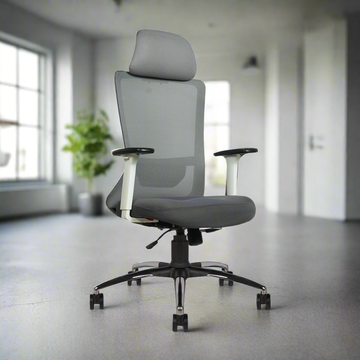
If you sit for most of the workday, look beyond cushioning and appearance. A good office chair for back pain should fit your body, support your lower back, and give you enough adjustment to stay comfortable throughout the day.
1. Lumbar Support
Look for support that follows the natural curve of your lower back. An ergonomic office chair with adjustable lumbar support lets you position it where your back actually needs it.
2. Seat Adjustment
Your feet should be flat on the floor with the seat supporting the length of your thighs without putting pressure behind the knees. An adjustable office chair will help you get the height and depth just right.
3. Backrest and Recline
Choose a backrest that supports you when sitting upright and when leaning back slightly. If back discomfort is already a concern, it also helps to understand more about choosing the right chair for back pain.
4. Adjustable Armrests
Armrests should support forearms while shoulders remain relaxed. If armrests push shoulders upward or keep you far from the desk, armrests are doing more harm than good.
5. Proper Fit
There is no single chair size that works for everyone. The best office chair for long hours is one that fits your height and body comfortably while giving you room to change positions.
Final Thoughts
Back pain at your desk can come from more than how long you sit. I have seen that often your office chair does not give your body the support it needs. The right height, good lumbar support, and proper seat position can turn ordinary sitting into something that feels natural.
Back pain can also come from an office chair that does not adapt to your body. A good ergonomic office chair should adapt to your body, not push you into a posture. Adjust it correctly, move during the day, and notice when your back starts to complain for a change because that may mean back pain is on the rise.
Frequently Asked Questions
1. Can an office chair cause lower back pain?
Yes, especially if your office chair does not support your back. Fit your body properly. The wrong height, poor lumbar support, and long hours of slouching can all add to discomfort.
2. Is lumbar support good for lower back pain?
Good lumbar support helps your lower back keep its natural curve while you sit. A lumbar support chair should feel supportive without pushing you forward.
3. What is the best sitting position for lower back pain?
Sit back in the chair, keep your feet supported, and let your shoulders relax. More importantly, don’t stay in one position all day. Knowing how to improve your posture while sitting can help make long desk hours more comfortable.
4. Is an ergonomic office chair worth it for long working hours?
A well-fitted ergonomic office chair can make a real difference when you work at a desk for hours. Look for adjustable lumbar support, seat height, armrests, and a backrest that lets you move comfortably.